Emergency apps

Last reviewed: March 2026
SafeZone
The University's new SafeZone app is available for download by staff and students to help make our campuses and University-affiliated locations safer.
Visit the University’s security SafeZone website for more information, including app functions and FAQs.
Mobile phone application
Download via the App Store / Google Play
Or visit the below QR code.

In the event of an emergency, the mobile app allows you to quickly share your location and details with the University Security team who will be able to get the right assistance to you.
Desktop application
The SafeZone desktop application is now available on your PC or laptop.
Simply type ‘SafeZone’ into your search bar and click to open.
Login with SSO and select location.
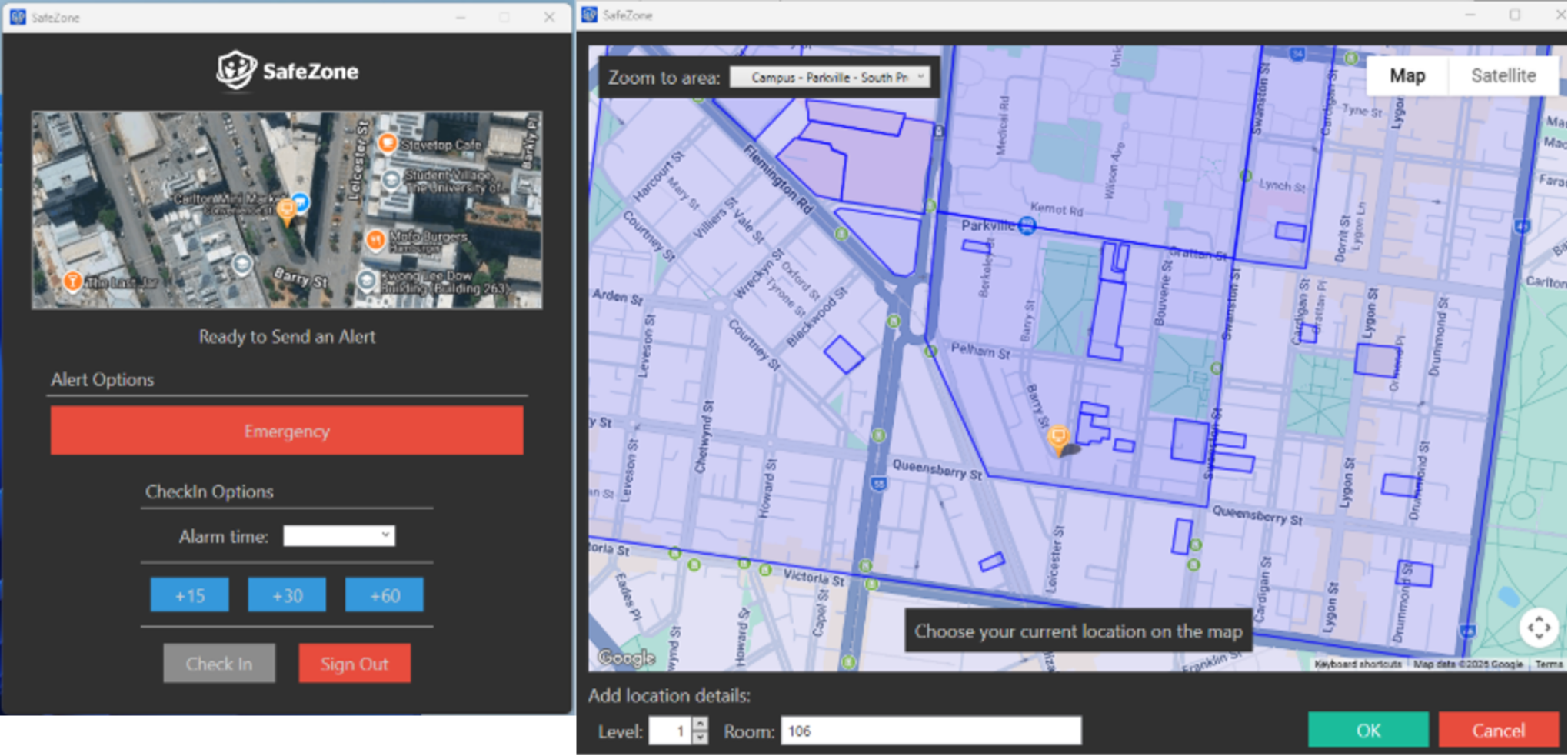
Within the SafeZone desktop app you can select location down to a level and room of a building which is ideal for a range of settings and situations including clinical environments, reception desks, and for those who don’t wish to download the app onto their personal mobile phone. It also allows you to select a working from home location.
VicEmergency
Staff and students who work, study, live or travel through areas of increased bushfire or grassfire risk are strongly encouraged to download the VicEmergency app to ensure access to timely emergency warnings and information when it matters most. Individual watch zones can be set up via the app to receive customised incident notification.
Download via App Store / Google Play
Also available on Desktop via the VicEmergency Website.

Emergency+
In an emergency, time and location accuracy are critical. By downloading the ‘Emergency +’ app, you’ll equip yourself with a powerful tool that will help you call Triple Zero (000) quickly, and allow you to accurately communicate your location to emergency call-takers.
Emergency + is a free application developed by Australia's emergency services and industry partners. The application works across Australia, using GPS functionality built into smartphones to help a Triple Zero (000) caller provide critical location details required to mobilise emergency services.
Download via App Store / Google play
Get Prepared
Get Prepared is an easy-to-use app that empowers you to make important decisions ahead of time by completing your RediPlan. Co-created by Australian Red Cross and NRMA Insurance, it helps you create a personal emergency plan, so you can take care of yourself, your loved ones, and what's important to you.
When emergencies happen there are lots of decisions to make and a lot to do. With the Get Prepared app you can prepare for the unexpected by completing your RediPlan and being better prepared for emergencies.
Download via App Store / Google play

BOM Weather
Australia's official weather app from the Bureau of Meteorology (BOM). Download the BOM Weather app for access to hourly and 7-day forecasts, radar and warnings – wherever you are.
The BOM Weather app includes: 1) current weather; 2) warning notifications; 3) forecasts; 4) past weather; 5) rain map; 6) locations.
Download via App Store / Google play